Blog ·
US passport photo requirements: size, background, glasses and more
A U.S. passport photo is a 2 x 2 inch (51 x 51 mm) color photo taken in the last six months, with your head 1 to 1 3/8 inches tall from chin to top of head. You face the camera with a neutral expression or a closed-mouth smile, without glasses, in front of a plain white or off-white background, and the photo is not edited. If you renew online, you upload a digital photo instead, and the same rules about how you look apply.
Where the US passport photo requirements come from
Everything below comes from the State Department's Passport Photos page, its page on uploading a digital photo, and the photo instructions on forms DS-11 and DS-82, as they read in October 2026. The photo page says: "Unacceptable photos are the number one reason why we put passport applications on hold."
Meeting the published US passport photo requirements does not guarantee acceptance. The passport agency decides.
US passport photo requirements at a glance
| Requirement | Rule |
|---|---|
| Size | 2 x 2 inches (51 x 51 mm) |
| Head size | 1 to 1 3/8 inches (25 to 35 mm), chin to top of head |
| Age and color | In color, taken in the last 6 months |
| Background | Plain white or off-white, no shadows, texture, objects or lines |
| Pose | Face the camera directly, head not tilted, head and shoulders centered |
| Expression | Neutral, or a smile with your mouth closed; eyes open |
| Glasses | Not allowed, unless a doctor's signed note explains why |
| Head covering | Only for religious or medical reasons, with a signed statement |
| Clothing | No uniform, uniform-like clothing, camouflage or headphones |
| Editing | No changes with software, apps or filters |
| Matte or glossy photo paper; no photocopies or scans | |
| Online renewal | JPG, JPEG, PNG, HEIC or HEIF file, 54 KB to 10 MB |
The US passport photo requirements in detail
Size and head height
"The correct printed size of a passport photo is 2 x 2 inches (51 x 51 mm)." Your head must measure 1 to 1 3/8 inches (25 to 35 mm) from the bottom of the chin to the top of the head, roughly half to two thirds of the photo's height. Hair may go past the edge if your whole head is in the photo.
Head size mostly comes down to distance. The photo page says to stand several feet from the camera: if the person taking the photo is too close or too far away, your head may come out the wrong size.
Position and pose
Face the camera directly, with your full face in view and your head level. Keep your head and shoulders centered. The photo page lists a head tilted to one side, a rotated head and looking down among the photos it does not accept.
Background
"Background must be white or off-white, free of shadows, and plain without texture, objects, or lines." If your wall is not white, the State Department suggests covering it with a white blanket or sheet. Stand several feet in front of it. If you use a wheelchair, part of the head support may show; include a note with your application explaining why the background is not completely white.
Lighting and image quality
Light your face evenly, with no shadows, and avoid a photo that is too bright or too dark. The online renewal page recommends a well-lit area with natural light.
The image must be sharp: "Submit a high-resolution color photo that is not blurry, grainy, or pixelated." Red eye is not accepted, and the State Department asks you to retake the photo rather than edit it out.
Expression and eyes
"You can smile in your photo." Keep your eyes open and your mouth closed, and avoid exaggerated expressions. The colored part of both eyes must be clearly visible, so keep your hair away from them. The online renewal page adds that you should avoid showing your teeth.
Glasses
The photo page says: "Take off any eyeglasses, sunglasses, or tinted glasses." Don't push them up onto your head either. If you cannot remove them for medical reasons, for example while recovering from eye surgery, include a signed note from your doctor with your application.
Hats, head coverings, clothing and jewelry
Take off hats, head coverings, face coverings and masks. A head covering worn for religious reasons needs a signed statement that it is religious attire you wear daily in public; one worn for medical reasons needs a signed statement from your doctor. Your full face must still be visible with no shadows on it, and the covering should be one color, without patterns or small holes.
You "cannot wear a uniform, clothing that looks like a uniform, or camouflage clothing," and no headphones or wireless hands-free devices in or on your ears. Wear the clothes you normally wear every day. Jewelry and facial piercings are fine as long as they do not hide your face.
No edits, filters or retouching
"Do not change your photo using computer software, phone apps or filters." The State Department says it checks every photo for digital changes, and that includes the background: the photo page shows a photo whose background was cut out with a retouching tool as unacceptable.
Age, paper and condition
Use a photo taken in the last six months, printed in color on matte or glossy photo-quality paper. Photocopies, scanned photos and damaged prints with holes, creases or smudges are not accepted. For a renewal by mail, form DS-82 says to attach the photo with four staples, vertically in the corners, and not to bend it.
Babies and toddlers
Children's photos follow the same rules. Lay your child on a plain white or off-white sheet, or cover a car seat with one. No other person can be in the photo, and nothing, including hands or a pacifier, should block the child's face. The child must face the camera with a neutral expression. "It is okay if a baby's eyes are not entirely open." Older children must have their eyes open.
The digital photo for online renewal
If you renew online, the upload page asks for:
- a JPG, JPEG, PNG, HEIC or HEIF file between 54 KB and 10 MB
- a color photo taken in the last six months
- a frame that ends at your shoulders, near where they meet your arms
- no filters or retouching, and no photo or scan of a printed photo
It gives no pixel dimensions. You can reposition or crop the photo in the application, and a photo tool checks the basics. An employee still reviews it later, and if there is a problem, the State Department sends a letter or email asking for a new one.
Checking a photo against the rules with OpenPhotoId
OpenPhotoId is a free tool that crops a photo to the U.S. passport format in your browser and measures the result against the US passport photo requirements. To make one now, use the US passport photo maker.
- Open openphotoid.com and choose Choose a photo.
- Under Which document?, find United States and choose Passport.
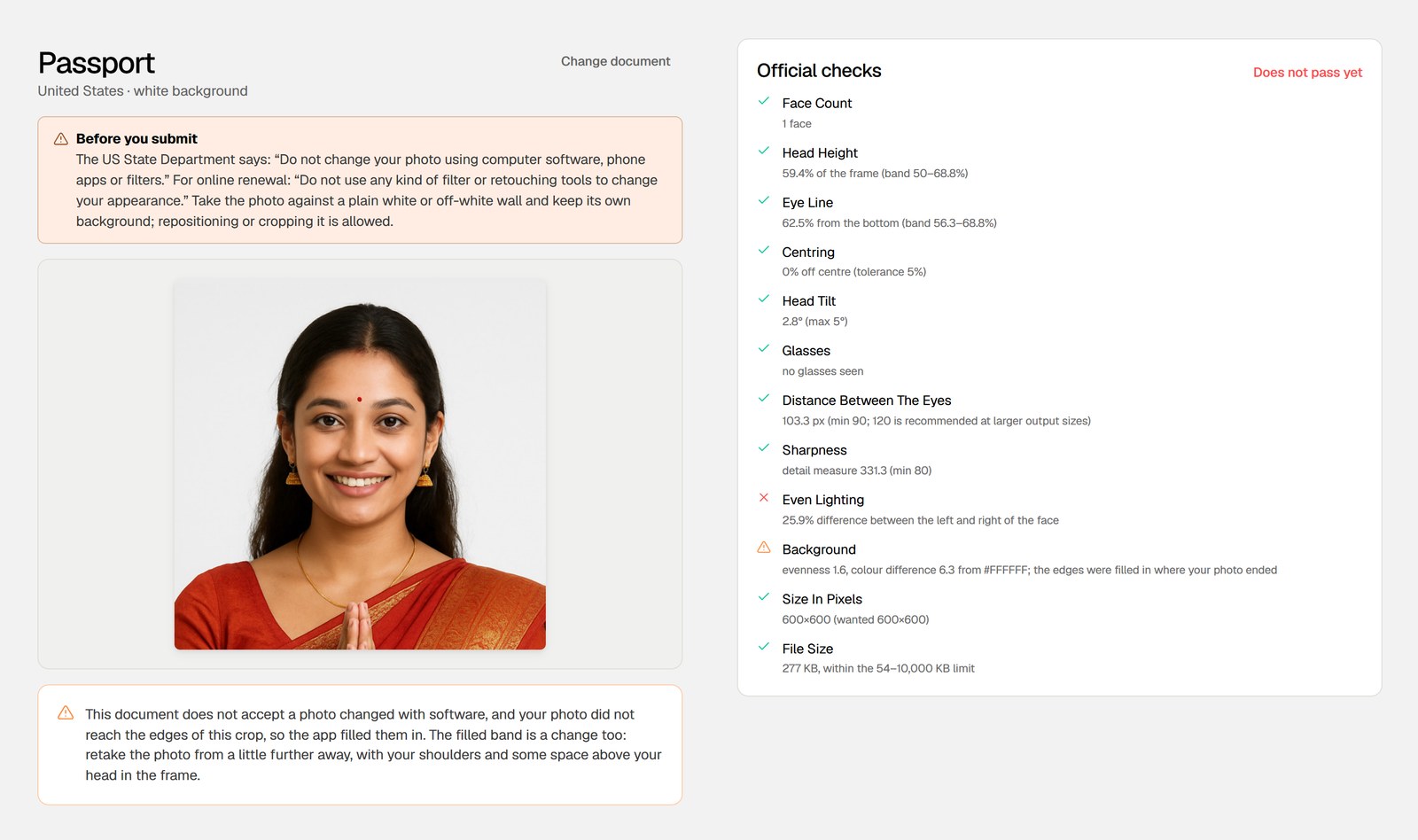
- Read Official checks: twelve checks, each showing the value it measured, with the overall result at the top.
How the checks line up with the US passport photo requirements:
- Head Height compares your head with a band of 50–68.8% of the frame, the 1 to 1 3/8 inch rule on a 2 inch photo. Eye Line, Centring and Head Tilt cover position.
- Glasses looks for glasses. Two portraits with glasses that we tried both failed: "this document does not accept them. Take them off."
- Background measures how far the background is from white. A portrait in front of a blue backdrop failed it.
- Even Lighting and Sharpness cover light and focus.
- Size In Pixels and File Size check the file against the 54 KB to 10 MB window.
The app keeps the background you photographed for a U.S. passport and checks it, rather than replacing it. If the photo is cropped tighter than the format needs, it fills in the missing edges, says so, and asks you to retake it from a little further away. What a passport photo check can measure explains each check.
No check looks at your expression, head covering, clothing, edits or the age of the photo. The test portrait above shows its teeth, which the online renewal page asks you to avoid, and no check flagged it.
Saving the photo
Under Save, For uploading gives a 600 × 600 px JPEG, which is 2 x 2 inches at 300 dpi. For printing at a shop lays the photo out with cutting guides: six copies on a 4×6" or 5×7" sheet, or 20 on A4 or Letter. Print at actual size, not "fit to page", and measure one photo before you cut. It should be 2 inches across.
The photo is processed in your browser tab and is not uploaded. Here is how that works. If a photo has already come back, see Passport photo rejected? Common reasons and how to check yours.
FAQ
Can I wear earrings in a U.S. passport photo?
Yes. The photo page says: "You can wear jewelry and keep on your facial piercings as long as they do not hide your face."
Is there a color I can't wear?
The photo page does not ban a color. It rules out uniforms, clothing that looks like a uniform, and camouflage.